
- What Is Domain Configuration?
- Why This Step Matters More Than You Think
- A Simple Domain Configuration Guide to Getting It Right
- Connecting Your Domain to Your Hosting
- Understanding What’s Happening Behind the Scenes
- Setting Up the Important Records
- Giving It Time to Settle
- Checking That Everything Works
- Where Most People Get Stuck
- How This Connects to the Bigger Picture
- Final Thoughts
- FAQ For Domain Configuration Guide
What Is Domain Configuration?
This domain configuration guide is for new website owners who have just bought a domain but are not sure what to do next.
If you’ve just bought a domain name, you’ve already taken a big step.
But here’s the part most people don’t expect: nothing really happens yet.
Your domain doesn’t automatically show a website. It doesn’t connect itself. It just sits there until you tell it what to do. That process of telling your domain where to go and how to behave is what we call domain configuration.
It might sound technical, but it’s actually more straightforward than it looks once you understand what’s going on.
Why This Step Matters More Than You Think
A lot of new website owners get stuck here, not because it’s difficult, but because it’s unfamiliar.
You might open your domain and see nothing. Or your website doesn’t load the way you expected. Sometimes emails don’t work, and it all feels confusing.
Most of the time, the issue isn’t the website—it’s the configuration behind it.
Getting this part right means your website loads properly, your domain connects smoothly, and everything works the way it should.
And once it’s set up correctly, you don’t have to keep fixing it.
A Simple Domain Configuration Guide to Getting It Right
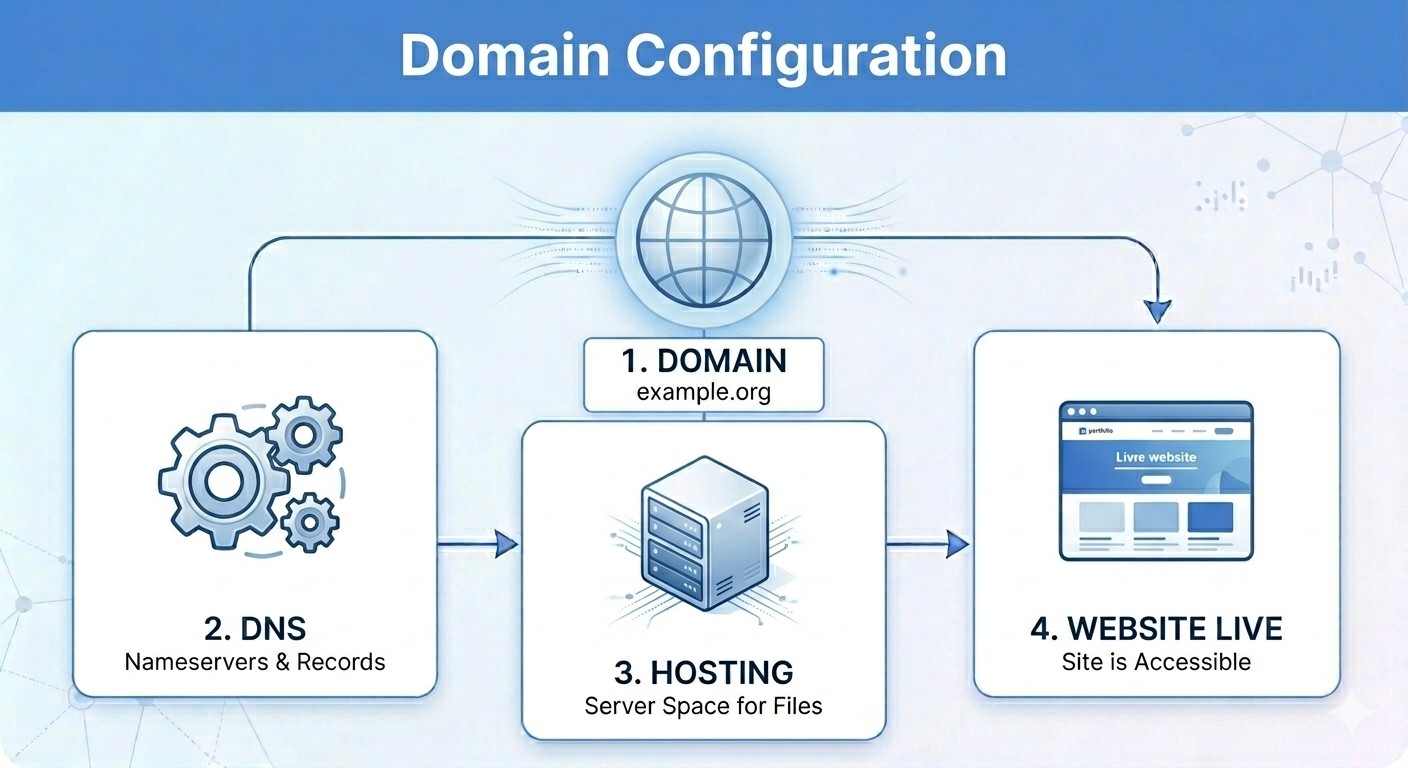
Instead of thinking about this as something technical, think of it as connecting pieces of a puzzle. Your domain, your hosting, and your website all need to talk to each other.
As you go through this domain configuration guide, you’ll start to see how each part connects.
Connecting Your Domain to Your Hosting
The first thing your domain needs is a place to send visitors. That’s your hosting.
When someone types your domain into a browser, your domain needs to know where your website lives. This is done through something called nameservers or DNS settings.
Once you update these, you’re basically telling your domain, “This is where my website is. Send people there.”
Without this connection, your website won’t show up at all.
Understanding What’s Happening Behind the Scenes
At this point, it helps to understand what’s quietly working in the background.
The internet uses a system that translates your domain name into something servers understand. This system is coordinated globally by organizations like ICANN, making sure everything connects properly no matter where you are in the world.
You don’t need to master it—you just need to know it exists and that your settings are part of it.
Setting Up the Important Records
Now that your domain knows where your website is hosted, there are a few small settings that help everything run smoothly.
These are called DNS records. Think of them as instructions your domain follows.
For example:
- one tells your domain where your website lives
- another handles your email
- others manage subdomains or redirects
Most hosting platforms guide you through this, so you’re not doing it blindly.
Take your time here. This is where small mistakes can cause confusion later.
Giving It Time to Settle
After you make changes, things might not update instantly.
This is something called propagation. It simply means the internet is taking time to update your new settings everywhere.
Sometimes it’s quick. Sometimes it takes a few hours.
During this period, your website might load in one place and not in another. That’s normal. It doesn’t mean something is broken.
Checking That Everything Works
Once things settle, it’s a good idea to check your setup.
Open your domain and see if your website loads. Try it on your phone. Try a different browser.
You’re just making sure everything feels right from a visitor’s point of view.
If it works smoothly, you’ve done it correctly.
Where Most People Get Stuck
It’s not usually the big things that cause problems. It’s the small ones.
Maybe the hosting wasn’t connected properly. Maybe a setting was missed. Maybe something was changed too quickly.
If something doesn’t work, don’t panic. Go back, check each connection, and take it step by step again.
That’s usually enough to fix it.
How This Connects to the Bigger Picture
Domain configuration is part of a larger process. After buying a domain, there are a few steps that come next, and understanding them makes everything easier.
If you want a clearer picture of what comes next, you can read this guide on what to do after buying a domain name and setting up your website to see how everything connects.
Final Thoughts
At first, domain configuration can feel like a barrier. But once you understand what’s happening, it becomes much simpler.
You’re not doing anything complicated, you’re just connecting things so they can work together.
By the end of this domain configuration guide, you should feel more confident setting things up on your own.
Take your time with it. Don’t rush. And once it’s done, you won’t have to worry about it again.
FAQ For Domain Configuration Guide
Do I need technical skills to configure a domain?
Not really. A basic understanding is enough, and most platforms guide you through it.
Why is my domain not working immediately?
It’s likely still updating. Give it some time to fully propagate.
Can I fix mistakes later?
Yes. You can always go back and adjust your settings if something isn’t working.