
Launching your website is a major milestone, but it’s only the beginning. A website that isn’t properly maintained can quickly become slow, vulnerable to cyberattacks, and difficult for customers to use. Over time, outdated software, broken links, expired security certificates, and poor performance can affect your search rankings, damage your reputation, and even cost you potential customers.
That’s why every business needs a website maintenance checklist.
Regular website maintenance helps protect your website, improve user experience, strengthen your SEO, and ensure everything works exactly as it should. Whether you run a business website, an online store, or a company blog, following a maintenance routine can save you from expensive problems in the future.
In this guide, we’ll walk you through the 15 essential website maintenance tasks every business should complete in 2026.
Why Website Maintenance Matters
Many business owners believe that once a website is live, the work is finished. Unfortunately, that’s one of the biggest mistakes you can make.
Your website depends on software, servers, databases, plugins, security certificates, and search engine optimization. These components constantly change, and if they aren’t updated regularly, your website can become vulnerable to hackers, lose search rankings, or stop functioning properly.
A well-maintained website offers several benefits:
- Better security against hackers and malware.
- Faster loading speeds for a better user experience.
- Improved Google rankings through better technical SEO.
- Reduced downtime.
- Higher customer trust.
- Better lead generation and conversions.
Simply put, website maintenance helps protect one of your business’s most valuable digital assets.
The Ultimate Website Maintenance Checklist
1. Update Your Website Software
Keeping your website software up to date is the foundation of every website maintenance checklist.
If you use WordPress or another content management system, updates often include security patches, bug fixes, and performance improvements. Running outdated software makes your website an easy target for hackers.
Always update:
- Your CMS
- Themes
- Plugins
- Extensions
Before updating, create a full backup so you can restore your website if anything goes wrong.
2. Back Up Your Website
Imagine losing your website overnight because of a server failure or cyberattack.
Without backups, rebuilding your website could take days or even weeks.
Schedule automatic backups and store copies securely in the cloud. Test your backups regularly to ensure they can be restored when needed.
3. Monitor Website Security
Website security should never be an afterthought.
Regularly scan your website for malware, remove unused plugins, monitor login attempts, and enable two-factor authentication where possible.
Learn more about protecting your website from online threats through the Cloudflare Learning Center, which offers practical security resources for website owners.
A secure website protects both your business and your customers’ information.
4. Check Your SSL Certificate
Your SSL certificate encrypts communication between your website and visitors.
If it expires, browsers may display a “Not Secure” warning, causing potential customers to leave immediately.
Check regularly that:
- HTTPS is working correctly.
- Your certificate hasn’t expired.
- Mixed-content warnings are resolved.
SSL certificates also contribute to better SEO and customer trust.
5. Improve Website Speed
Website speed directly affects user experience and search rankings.
If your website loads slowly, visitors are more likely to leave before exploring your products or services.
Improve performance by:
- Compressing images.
- Enabling browser caching.
- Removing unnecessary plugins.
- Choosing reliable hosting.
- Optimizing your database.
A faster website creates happier visitors and better conversion rates.
Test your website regularly using Google PageSpeed Insights to identify performance issues and discover recommendations for improving loading speed.
6. Fix Broken Links
Broken links frustrate visitors and signal poor website quality.
Regularly check for:
- Broken internal links.
- Broken external links.
- Missing images.
- 404 errors.
Fixing these issues improves both SEO and user experience.
7. Test Contact Forms
Your contact form is often your primary lead generation tool.
If it stops working, potential customers can’t reach you.
Submit test enquiries regularly to confirm:
- Forms send successfully.
- Emails arrive.
- Confirmation messages appear correctly.
A simple test can prevent lost business opportunities.
8. Review Your Website Content
Fresh content keeps your website relevant to both visitors and search engines.
Take time to review your pages and ensure that your:
- Contact information is correct.
- Services are up to date.
- Pricing is accurate.
- Business hours are current.
- Blog posts contain updated information.
Refreshing existing content is often easier and more effective than constantly creating new pages. Google rewards websites that stay current and continue providing value to users.
9. Check Mobile Responsiveness
More than half of all website traffic comes from mobile devices. If your website doesn’t work well on smartphones or tablets, you’re likely losing potential customers.
Test your website on different devices and check that:
- Menus are easy to navigate.
- Text is readable.
- Buttons are easy to tap.
- Images display correctly.
- Forms work properly.
A mobile-friendly website improves user experience and supports better search rankings.
10. Monitor Website Analytics
You can’t improve what you don’t measure.
Tools like Google Analytics and Google Search Console help you understand how visitors interact with your website.
Monitor key metrics such as:
- Organic traffic
- Most visited pages
- Bounce rate
- Average session duration
- Conversion rate
- Search queries
- Technical errors
These insights help you identify what’s working and where improvements are needed.
11. Remove Unused Plugins and Themes
Unused plugins and themes take up space and may introduce security vulnerabilities.
Review your website regularly and remove anything you no longer use. Keeping only essential plugins helps improve website performance and reduces maintenance headaches.
12. Monitor Website Uptime
Every minute your website is offline can mean missed enquiries, lost sales, and frustrated customers.
Use uptime monitoring tools to receive alerts if your website becomes unavailable. The sooner you’re notified, the faster you can resolve the issue and minimize disruption.
13. Review Your SEO
SEO is an ongoing process not a one-time task.
As part of your website maintenance checklist, review your:
- Page titles and meta descriptions
- Keyword performance
- Internal links
- Broken links
- Image alt text
- Core Web Vitals
- Indexed pages
Regular SEO maintenance helps keep your website visible in search results and drives consistent organic traffic.
For official SEO best practices, visit Google Search Central, where Google provides guidance on improving your website’s visibility in search results.
14. Test Your Business Email
Your professional email should work as reliably as your website.
Check that:
- Emails are sending and receiving correctly.
- Spam filters aren’t blocking important messages.
- DNS records (SPF, DKIM, and DMARC) are configured properly.
Reliable business email builds trust and ensures you never miss important enquiries.
15. Perform an Annual Website Audit
At least once a year, take a step back and evaluate your website as a whole.
Ask yourself:
- Does the design still reflect your brand?
- Is your content still relevant?
- Are your pages converting visitors into customers?
- Is your hosting plan still suitable?
- Are there new features your customers would benefit from?
An annual audit helps you identify opportunities to improve your website before problems arise.
Monthly Website Maintenance Checklist
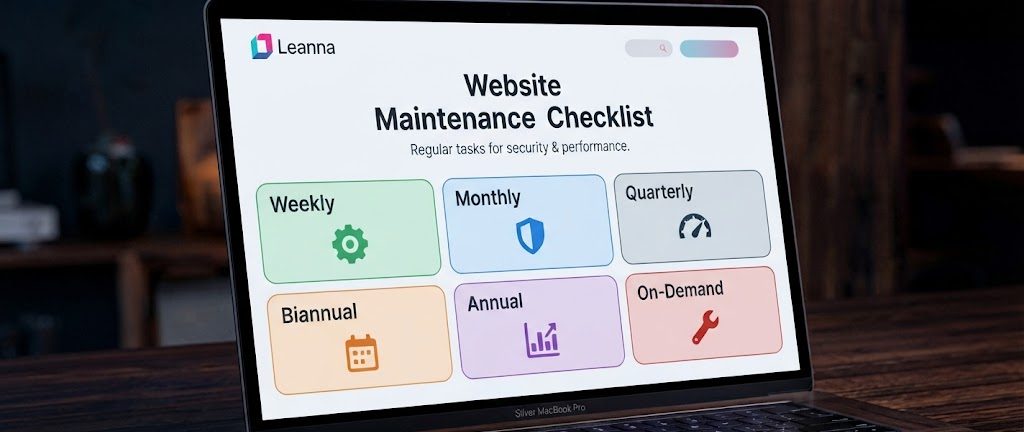
To keep your website in excellent condition, complete these tasks every month:
- Update your CMS, plugins, and themes.
- Back up your website.
- Scan for malware and security issues.
- Test your contact forms.
- Check website speed.
- Review analytics.
- Fix broken links.
- Verify your SSL certificate.
- Monitor website uptime.
- Review important pages for outdated information.
Following this monthly routine keeps your website secure, fast, and reliable.
Should You Maintain Your Website Yourself?
Small business owners with technical experience may choose to maintain their own websites. However, website maintenance requires time, consistency, and ongoing knowledge of security, hosting, SEO, and performance optimization.
For many businesses, outsourcing website maintenance is a smarter investment. It reduces the risk of costly mistakes, improves website performance, and allows you to focus on running your business instead of troubleshooting technical issues.
Why Choose Leanna for Website Maintenance?
At Leanna, we understand that your website is more than just a collection of web pages, it’s a powerful business tool.
Our website maintenance services help businesses stay secure, fast, and competitive by providing:
- Regular website updates
- Security monitoring
- Malware protection
- Website backups
- Performance optimization
- SSL certificate management
- Uptime monitoring
- Technical support
Whether you’re running a company website, an e-commerce store, or a growing online business, we help ensure your website continues to perform at its best.
Conclusion
A successful website isn’t something you build once and forget. It requires regular care, updates, and optimization to remain secure, fast, and effective.
By following this website maintenance checklist, you’ll improve website performance, strengthen your SEO, protect your business from security threats, and create a better experience for your visitors.
The best time to maintain your website is before problems occur not after. A proactive approach will save you time, money, and unnecessary stress while helping your business grow online.
Need help maintaining your website? Contact Leanna today for professional website maintenance, hosting support, security monitoring, and performance optimization.
Frequently Asked Questions
What is a website maintenance checklist?
A website maintenance checklist is a list of regular tasks designed to keep your website secure, updated, fast, and functioning properly. It includes software updates, backups, security monitoring, performance optimization, and SEO reviews.
How often should I maintain my website?
Basic maintenance should be performed every month. High-traffic websites may require weekly monitoring, while a full website audit should be completed annually.
Does website maintenance improve SEO?
Yes. Regular maintenance improves page speed, fixes broken links, updates content, enhances security, and supports better search engine rankings.
Can I maintain my website myself?
Yes, but it requires technical knowledge and time. Many businesses choose professional website maintenance services to ensure their websites remain secure and fully optimized.
What happens if I don’t maintain my website?
Neglecting website maintenance can lead to security vulnerabilities, slower loading speeds, broken functionality, lower search rankings, and lost business opportunities.