
- Table of Contents
- What Is a Domain Name?
- What Is Web Hosting?
- How Hosting vs Domain Actually Work Together
- The Technical Side: DNS Explained
- Key Differences Between Hosting vs Domain
- Why Getting Both Right Matters
- How to Choose the Right Hosting and Domain Name
- Where to Buy Hosting and Domains in Nigeria
- Final Thoughts
Table of Contents
-
What Is a Domain Name?
-
What Is Web Hosting?
-
How Hosting vs Domain Actually Work Together
-
The Technical Side: DNS Explained
-
Key Differences Between Hosting vs Domain
-
Why Getting Both Right Matters
-
How to Choose the Right Hosting and Domain Name
-
Where to Buy Hosting and Domains in Nigeria
-
Final Thoughts
What Is a Domain Name?
A domain name is your website’s address on the internet, like leanna.ng. It’s human-friendly, easy to remember, and points people to your website.
Think of it like:
-
Your home address = Domain
-
Your actual house = Hosting
Without a domain, no one can locate your business online.
When you register a domain, you don’t fully “own” it forever; you pay a registrar for the right to use it for a fixed period (usually yearly). Many domain registrars (including local ones) make it easy to check if a name is available.
Your domain name is part of your brand identity. Choosing a short, memorable, and relevant name matters, especially for business visibility.
Learn more about domains at: leanna.ng domain registration
What Is Web Hosting?
Web hosting is where your website “lives.” Think of it as the land on which your house (website) is built. All your website’s files — text, images, databases — must be stored somewhere for people to access them. That’s what a host provides.
A web host gives you space on a server (a powerful computer), and ensures that your site is always online, serves pages when requested, and handles traffic.
Depending on your needs, there are different types of hosting:
-
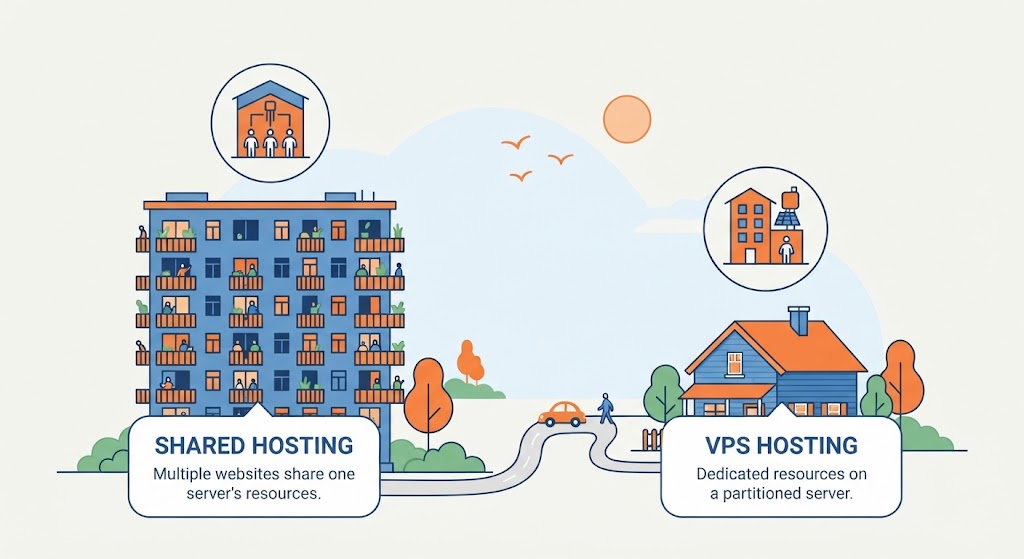
Shared Hosting – many websites on one server, cheaper but limited resources.
-
VPS / Cloud Hosting – more power, more control TechRadar+1
-
Dedicated Hosting – a server fully for you
How Hosting vs Domain Actually Work Together
Knowing hosting vs domain separately is helpful, but real power comes when they work together.
-
When someone enters your domain name in their browser, the system doesn’t directly “go to the files.” Instead, the browser checks a service called DNS (Domain Name System) to find out which server holds your website.
-
DNS translates your readable domain (e.g. yourbusiness.ng) into the IP address of your hosting server. cloudflare.com+1
-
Once the browser has the IP, it reaches out to your web host, fetches your files, and renders the webpage for the visitor.
In short: domain name = address, hosting = home / storage, and DNS = the map that connects them.
The Technical Side: DNS Explained
The Domain Name System (DNS) is often called the “phonebook of the internet” because it translates human names (domains) into machine IP addresses. Wikipedia
Here’s a quick simplified DNS lookup process:
-
You type yourbusiness.ng into your browser.
-
The browser sends a request to a DNS resolver (often provided by your ISP).
-
That resolver may ask root DNS servers, then TLD (Top-Level Domain) servers, until it finds your domain’s authoritative nameserver.
-
The nameserver gives back the IP address for your hosting server.
-
Your browser connects to your host and loads your site.
This all happens in milliseconds, but it’s absolutely essential for how hosting vs domain works.
One more technical note: using DNS incorrectly (or using insecure DNS) can expose your site to attacks like DNS spoofing. Wikipedia So choosing good DNS / nameserver configuration matters for security.
Key Differences Between Hosting vs Domain
| Feature | Domain Name | Web Hosting |
|---|---|---|
| Purpose | Identifies your site (your address) | Stores your website’s files and delivers content |
| How You Pay | Annually via a registrar | Monthly or yearly via a hosting provider |
| Control | You manage DNS settings, renewal | You manage files, databases, performance |
| Dependency | Pointed to a host via DNS | Needs a domain (or subdomain) to be accessible |
Why Getting Both Right Matters
Getting only one right, but neglecting the other, can hurt your website:
-
Weak hosting: Even with a perfect domain name, poor hosting can mean slow page loads, crashes, and bad user experience.
-
Bad domain name: Great hosting is wasted if your domain is confusing, hard to remember, or not on-brand.
-
Wrong DNS setup: If DNS isn’t configured correctly, people may not reach your website or it may be vulnerable to attack.
For Nigerian businesses, having a local or credible domain extension (like .ng or .com) combined with reliable hosting ensures your site is both memorable and fast.
How to Choose the Right Hosting and Domain Name
Choosing a Domain Name
-
Keep it short, memorable, and relevant to your business.
-
Use simple spelling, avoid hyphens or numbers.
-
Choose a domain extension that aligns with your brand, for example, .ng if you’re focused on the Nigerian audience.
Choosing a Hosting Plan
-
Estimate your expected website traffic.
-
Decide what kind of content you’ll host (just text? images? videos or ecommerce?).
-
Prioritize a hosting provider with good uptime, security, and customer support.
-
Make sure the host allows scalability, when your business grows, your hosting plan should grow with you.
Where to Buy Hosting and Domains in Nigeria
-
Many global registrars and hosts are available, but using a local Nigerian host like leanna can reduce latency and make payment easier.
-
You don’t necessarily need to buy your domain and hosting from the same place, but it can make setup simpler if you do.
-
When comparing providers, check: renewal pricing, security (SSL), backup policies, and extra features.
Final Thoughts
Understanding hosting vs domain is essential for building a strong, scalable, and reliable website. These are not interchangeable, they are distinct but deeply connected.
-
Domain = your brand’s address
-
Hosting = where your website lives
-
DNS = the bridge that connects them
With the right combination, your website can be fast, secure, and easy for customers or readers to find. For small business owners in Nigeria, this is a foundation you can build on confidently.
Ready to take the next step?
Explore Leanna.ng’s affordable and reliable hosting plans designed for Nigerian businesses.